
































Key Takeaways
- Midea units come in three Wi-Fi types: built-in Wi-Fi, Wi-Fi-ready with a port for Midea's module, and no Wi-Fi support at all, so identify yours before you start.
- MSmartHome is Midea's current app, though some older units point to Midea Air or NetHome Plus, so follow the app named on your unit's QR code or manual.
- Most pairing failures come from the network, especially 5 GHz-only networks and mesh routers that merge 2.4 GHz and 5 GHz under one name.
- Resetting means power-cycling and re-pairing: cut power for a minute or two, reseat the module if there is one, remove the unit from the app and add it again.
- A Wi-Fi-ready Midea needs Midea's own module, not a generic USB Wi-Fi stick, and it only fits models built for it.
- An IR smart controller works on almost any Midea with a remote, but infrared is one-way, so changes made with the original remote won't show in the app.
Many newer Midea air conditioners have built-in Wi-Fi and connect through Midea's MSmartHome app on a 2.4 GHz network. Others are Wi-Fi-ready and need Midea's plug-in Wi-Fi module first. Older or basic models have no Wi-Fi at all, and an infrared smart AC controller is the usual way to add app control to them.
This guide follows the three questions Midea owners actually ask, in order: does my unit have Wi-Fi, how do I set it up and fix pairing, and what are my options if it has none. For a brand-neutral walkthrough, see our guide to connecting any AC to Wi-Fi.
All You Need to Know About Midea Air Conditioner Wi-Fi
- Does My Midea Air Conditioner Have Wi-Fi?
- How Do I Set Up Wi-Fi in the Midea App?
- Midea AC Not Connecting to Wi-Fi? Common Pairing Failures and Fixes
- How Do I Add Wi-Fi to a Midea Air Conditioner That Has None?
- Built-In Wi-Fi vs Midea Module vs IR Controller: Which Fits Your Unit?
- What Can You Do Once Your Midea AC Is on Wi-Fi?
- FAQ
Does My Midea Air Conditioner Have Wi-Fi?

Midea units fall into three groups: built-in Wi-Fi, Wi-Fi-ready with a slot for a module, and no Wi-Fi support. Which one you own decides every next step, so check this before downloading anything.
Built-In Wi-Fi
Look for Wi-Fi or "smart" wording on the box, spec sheet or product listing, and a QR code sticker on the unit or in the manual that points to the app. Many recent Midea window and portable models ship this way and are ready to pair out of the box.
Wi-Fi-Ready (Module Required)
Some units, most often ductless mini splits, have a USB-style port behind the indoor unit's front panel, usually labelled for a Wi-Fi or smart module. The app can't find these units until Midea's own Wi-Fi module is plugged in; a generic USB Wi-Fi stick will not work.
No Wi-Fi Support
If the manual never mentions Wi-Fi, there's no QR code and no module port, the unit is remote-only. To be sure, look up the full model number from the rating label on the side of the unit on Midea's website.
- Check the rating label: the full model number is the most reliable way to confirm Wi-Fi support.
- Check the manual's index: a Wi-Fi or app chapter means the unit supports it in some form.
- Check under the front panel: on split units, a small covered port near the filter usually means Wi-Fi-ready.
How Do I Set Up Wi-Fi in the Midea App?
Midea's current app is MSmartHome, available for iPhone and Android. If your manual or QR code names Midea Air or NetHome Plus, use the app your unit points to, since Midea has moved most newer units to MSmartHome but older ones may differ.
Step-by-Step Setup
- Install the app and create an account: sign in before you start pairing so the process isn't interrupted.
- Connect your phone to 2.4 GHz Wi-Fi: stand near the AC and allow the location and Bluetooth permissions the app asks for.
- Add the device: scan the QR code on the unit or manual, or pick your appliance type from the list.
- Put the AC in pairing mode: follow the in-app prompt; on many units the display shows "AP" or a Wi-Fi icon blinks. On many Midea split units, the manual says to press the LED or Display button 7 times within 10 seconds on the remote.
- Enter your Wi-Fi password: type it carefully, as the app can't verify it before trying.
- Name and test the unit: change the set temperature from the app and confirm the AC responds.
Pairing mode usually stays open for only a few minutes. If it times out, start pairing mode again rather than waiting on the app.
Midea AC Not Connecting to Wi-Fi? Common Pairing Failures and Fixes

When pairing fails, the cause is almost always the network or the phone, not the air conditioner. Work through these in order.
Your Network Is 5 GHz Only
Midea's Wi-Fi modules, like most appliance Wi-Fi, connect on 2.4 GHz only. If your router broadcasts only 5 GHz, the AC can't see it, so turn on the 2.4 GHz band in your router settings.
Band Steering Hides the 2.4 GHz Band
Mesh systems and many newer routers use band steering, one network name for both bands. Pairing can fail when the phone sits on 5 GHz, so split the bands into separate names, create a 2.4 GHz IoT or smart-home network, or pause 5 GHz during setup.
Pairing Times Out (Try AP Mode)
In AP mode, the AC broadcasts its own small Wi-Fi network, often named something like net_ac_XXXX. When the app tells you to, open your phone's Wi-Fi settings, join that network, then return to the app to finish.
Phone Settings Get in the Way
- Turn off VPNs and private relay: they can block the phone from talking to the AC locally.
- Turn off mobile data during AP mode: otherwise the phone may drop the AC's network because it has no internet.
- Allow location access: both iPhone and Android need it for apps to read Wi-Fi network names.
Router Security and Network Type
- WPA3-only security: switch to WPA2 or WPA2/WPA3 mixed mode if the module won't join.
- Guest networks: client isolation can stop the phone from reaching the AC.
- Login-page Wi-Fi: networks in dorms or apartment buildings that need a browser sign-in usually won't work.
- Weak signal: if the indoor unit is far from the router, a mesh node or extender nearby can help.
Reset the Wi-Fi Module
Switch the AC off at the plug or breaker for a minute or two, then power it back on. On Wi-Fi-ready units, also unplug and reseat the module, then delete the unit from the app and pair from scratch.
If the AC isn't cooling properly once it's connected, that's a separate problem; see common causes of an AC running but not cooling.
How Do I Add Wi-Fi to a Midea Air Conditioner That Has None?

You have two realistic routes: Midea's Wi-Fi module, if your unit has the port, or an infrared (IR) smart AC controller, which works with almost any Midea that uses a handheld remote.
Option 1: Midea's Wi-Fi Module
This only works on Wi-Fi-ready models. Confirm compatibility with your full model number, buy the module from Midea or an authorised seller, plug it into the port with the power off, then pair through the app. Because it talks to the AC's control board directly, the app sees the unit's real state, even when someone uses the remote.
Option 2: An IR Smart AC Controller
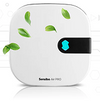
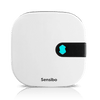
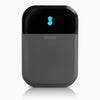
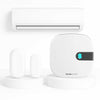
An IR controller sits in the room and sends the same infrared signals as your remote, so it works on Midea mini splits, window units and portables with no wiring. Sensibo Sky, Sensibo Air and Sensibo Air Pro connect to your Wi-Fi and add schedules, location-based on/off and voice control.
Our Midea smart AC page covers compatibility and setup for Midea units specifically.
The One-Way Caveat
Infrared is one-way: the controller sends commands but can't read the AC's state. If someone uses the original Midea remote, the app won't see it and will show a stale setting, so the simplest habit is to control the AC from the app and keep the remote in a drawer.
Built-In Wi-Fi vs Midea Module vs IR Controller: Which Fits Your Unit?
The right choice depends on what your unit supports and how much you care about features beyond basic app control.
|
Option |
Works on |
Sees changes made with the remote |
What you need |
Best for |
|
Built-in Wi-Fi |
Midea models sold with Wi-Fi |
Yes |
MSmartHome app and 2.4 GHz Wi-Fi |
Owners whose unit already supports it |
|
Midea Wi-Fi module |
Wi-Fi-ready models with the port |
Yes |
Compatible module, app, 2.4 GHz Wi-Fi |
Wi-Fi-ready units where you want Midea's own app |
|
IR smart controller (Sensibo) |
Almost any Midea with an IR remote |
No, IR is one-way |
Controller in line of sight of the AC, Sensibo app |
Units with no Wi-Fi, or several AC brands in one app |
If your Midea has working built-in Wi-Fi, start there. If it has no port, an IR controller is the practical route, and it's also handy when you run several AC brands and want them in one app.
For a broader look at control options, read AC control panels, remotes and Wi-Fi options and what works as a smart thermostat for a mini split.
What Can You Do Once Your Midea AC Is on Wi-Fi?
Once connected, the AC becomes controllable from anywhere, not just from across the room. The most useful things to set up first:
- Remote on and off: cool the house before you get home instead of running the AC all day.
- Schedules: match cooling to when rooms are actually used.
- Voice control: MSmartHome and Sensibo both work with popular voice assistants; see controlling your AC with an iPhone.
- Monitoring while away: check room temperature and humidity remotely, as covered in remote home temperature monitoring.
- Smarter modes: use dry mode on humid days and sleep mode at night.
FAQ
What app does a Midea air conditioner use for Wi-Fi?
Most current Midea air conditioners use the MSmartHome app for iPhone and Android. Some older units were set up with the Midea Air or NetHome Plus apps. Use whichever app the QR code or manual for your specific model points to.
Why won't my Midea AC connect to 5 GHz Wi-Fi?
Midea's Wi-Fi modules connect on 2.4 GHz only, like most appliance Wi-Fi. If your router uses one network name for both bands, give the 2.4 GHz band its own name or pause 5 GHz during setup, and make sure your phone is on 2.4 GHz while pairing.
How do I reset the Wi-Fi on my Midea air conditioner?
Switch the unit off at the plug or breaker for a minute or two, then power it back on. On units with a plug-in module, also unplug and reseat the module. Then delete the AC from the app and pair it again from the start.
Can I add Wi-Fi to an old Midea air conditioner?
If the unit has a Wi-Fi module port, you can add Midea's own compatible module. If it has no port, an infrared smart AC controller such as Sensibo Sky, Air or Air Pro adds app control by sending the same signals as the remote. Almost any Midea with an IR remote works this way.
Does Midea Wi-Fi work with Alexa and Google Assistant?
Many Wi-Fi-enabled Midea models can be linked to Alexa and Google Assistant through the MSmartHome app. Support depends on the model, so check the app's voice assistant section once the unit is paired.
Will a Sensibo controller show changes I make with the Midea remote?
No. Sensibo Sky, Air and Air Pro control the AC by infrared, which is one-way, so changes made with the original remote don't reach the app. The app will show the last setting it sent, so it's best to control the AC from the app and keep the remote put away.