








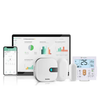

























PMS integration is the connection between a property management system and a building's HVAC controls, allowing room climate to respond automatically to guest check-in and check-out events. In hotels, the PMS tracks reservations, room assignments, and occupancy status. When that data feeds into the HVAC system, unoccupied rooms can setback to energy-saving temperatures and return to guest-comfort levels before arrival, without front desk staff or housekeeping touching a thermostat.
How PMS-to-HVAC Integration Works
The PMS sends occupancy status updates to a connected HVAC controller or building management system through an API or middleware layer. The logic is straightforward:
PMS Event |
HVAC Response |
Room booked, guest checked in |
Set room to occupied comfort range (typically 70-74°F / 21-23°C) |
Guest checked out |
Setback to unoccupied range (typically 80-85°F cooling / 60°F heating) |
Room blocked for maintenance |
Hold at minimum protection temperature only |
Pre-arrival window (e.g., 30 min before check-in) |
Begin pre-cooling or pre-heating to reach comfort range |
The energy impact is large because hotel rooms sit empty for a substantial share of the day. A 200-room property with 70% average occupancy has roughly 60 rooms unoccupied at any given time. Running those rooms at full comfort temperature around the clock wastes 30-40% of the HVAC energy those rooms consume.
PMS Integration in Multi-Unit Properties
The same principle applies outside hospitality. Serviced apartments, student housing, and co-living spaces use PMS or tenant management platforms that track lease status, booking windows, and unit turnover. Connecting that data to per-unit HVAC controllers allows the same setback logic: condition the unit when someone is scheduled to be there, save energy when it is vacant. The gap between "the system knows the room is empty" and "the HVAC acts on that information" is where the savings sit, and PMS integration closes it.